SLIDE 01
The original scorecard

Before coming into the compliance analyst role, my department created a quantitative metric for determining each funded agency’s efficiency in the agreed upon metrics labeled “The Scorecard”
PROJECT / Professional / Excel
Reworking a compliance scorecard toward quantitative scales and formulas instead of inconsistently documented qualitative scoring.

01 / THE QUESTION
How could compliance scoring become more consistent when the previous qualitative scales were poorly documented?
02 / THE APPROACH
03 / KEY INSIGHTS
Consistent scoring requires clear definitions as well as formulas: reporting labels, client projections, and mandatory-meeting criteria each needed an explicit treatment.
04 / OUTCOME & IMPACT
Developed an Excel scorecard that combines reporting, clients-served, and attendance measures into category scores and an overall rating.
THE PROJECT IN DETAIL
SLIDE 01
Before coming into the compliance analyst role, my department created a quantitative metric for determining each funded agency’s efficiency in the agreed upon metrics labeled “The Scorecard”
SLIDE 02

My goal while working on the 23' - 24' scorecard, was to modify the calculations so it only contained quantitative scales and formulas. The previous scorecard contained qualitative scales to determine scores which was poorly documented and was inconsistent,
SLIDE 03
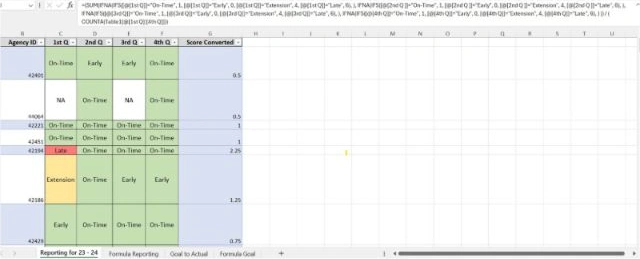
For the Reporting Data. I gave each of the 4 labels (Early, On-Time, Extension & Late) the respective values (0,1,4,6) and created the formula that assigned the correct values to calculate the average score for each agency using IFNA & IFS
SLIDE 04

The Clients Served Category was pretty straight forward and it only involved importing the data from our Grant Management Software on the quarterly agency reports. The total number served was divided by the projections to achieve the percentage that will be used.
SLIDE 05

To retrieve the attendance score for the agencies, I had to speak with each team to determine which meeting met the criteria for “mandatory quarterly meetings”. After inputting all of the correct data, each agency received a percentage for each category.
SLIDE 06

I create 3 tables to compiled all of the Attended meeting vs Total Meetings for each agency in each category. To achieve this, I primary used XLOOKUP for simplicity.
SLIDE 07
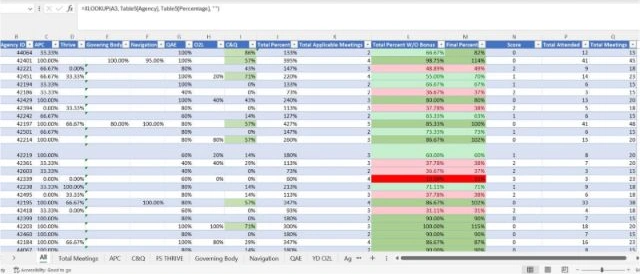
For each of the 3 scorecard categories’ data compiled, all that was left was to make sure all of the equations for each category was in place. Each category would receive a score from 0 - 3. With 0 being the best and 3 being the worst. The reporting calculation was left alone and just rounded to the nearest whole number. The client projection and attendance calculation used specific ranges of the percentages to get its score.
SLIDE 08

To complete the Scorecard Score all the categories were averaged and the final overall score (0, 1, 2, 3) were given between the current range of the averages.
=IFS(score<1, 0, score, <1.25, 1, score<=1.5, 2, score>1.6 3)
Screenshots and slide descriptions from Gerry Taylor II’s scorecard project presentation. Formula examples are reproduced as documented in the original slides.
Get in touch ↗